aggregate()
Use this when you want to perform statistical calculations such as averages and maximum values.
Available Keys
| Key Name | Description | Optional | Notes |
|---|---|---|---|
| where | Specify retrieval conditions | Yes | If omitted, all rows are retrieved |
| orderBy | Sort settings | Yes | If specifying only one column, the array can be omitted |
| take | Set the number of records to retrieve | Yes | |
| skip | Set the number of records to skip | Yes | |
| cursor | Cursor-based pagination | Yes | See findMany cursor for details |
| _avg | Average display settings | Yes | Only numeric columns can be specified. See Columns Each Aggregation Key Accepts for details |
| _count | Hit count display settings | Yes | Any column can be specified. _all and the true shorthand are also available. See _count for details |
| _max | Maximum value display settings | Yes | Number / string / boolean / date columns can be specified. See Columns Each Aggregation Key Accepts for details |
| _min | Minimum value display settings | Yes | Number / string / boolean / date columns can be specified. See Columns Each Aggregation Key Accepts for details |
| _sum | Sum display settings | Yes | Only numeric columns can be specified. See Columns Each Aggregation Key Accepts for details |
In where, you can also use relation filters (some / every / none / is / isNot).
Example Sheet
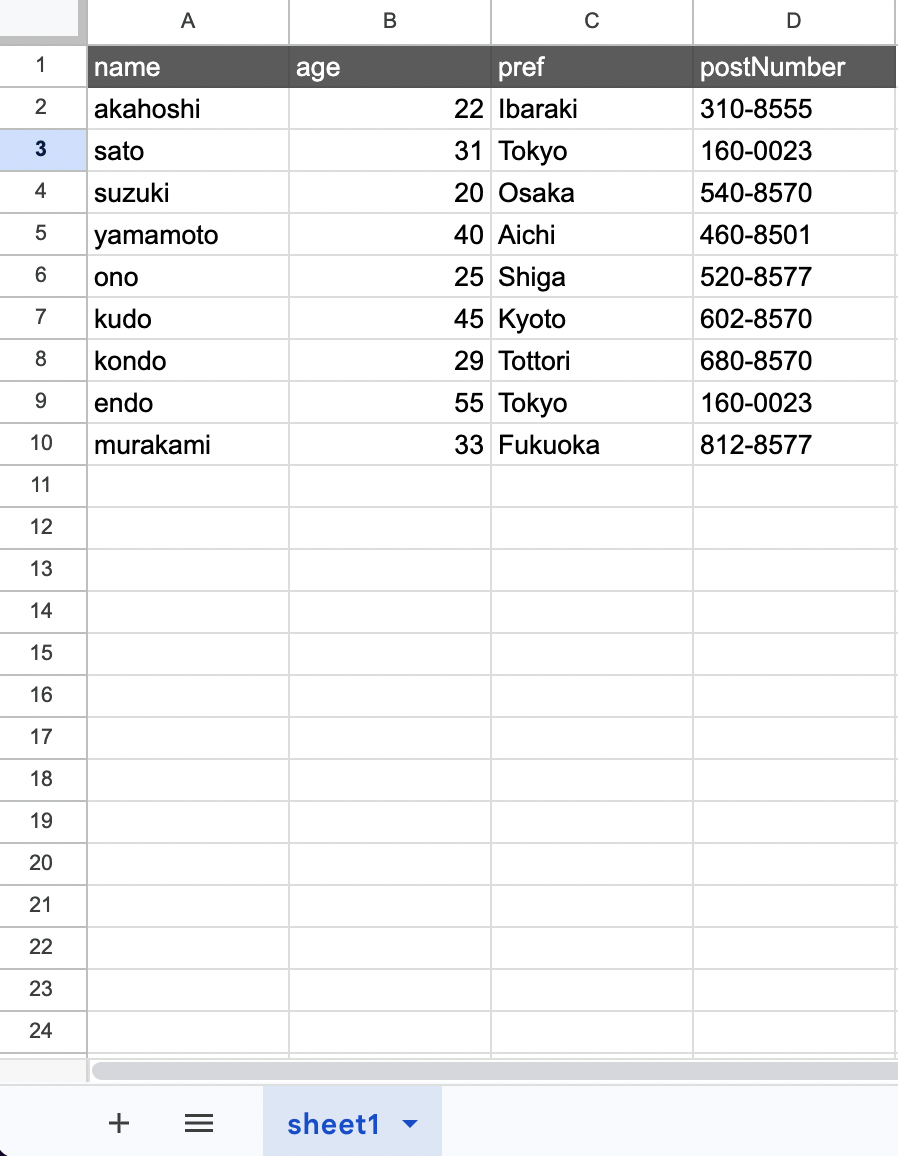
Explanation
Suppose you want to perform the following operations from the example above.
- age => Calculate the average
- age => Calculate the maximum value
- age => Calculate the minimum value
The code would be as follows.
// gassma.{{TARGET_SHEET_NAME}}.aggregate
const result = gassma.sheet1.aggregate({
  _avg: {
    age: true,
  },
  _max: {
    age: true,
  },
  _min: {
    age: true,
  },
});
The return value is in the following format.
{
  _avg: { age: 33.333333333333336 },
  _max: { age: 55 },
  _min: { age: 20 }
}
In _avg / _sum / _max / _min, NaN / invalid Dates (Invalid Date) are excluded from aggregation as missing values, just like null. If every aggregated value is missing, the result is null.
Columns Each Aggregation Key Accepts
The column types you can specify differ per aggregation key.
| Aggregation Key | Accepted Column Types |
|---|---|
| _avg | Number |
| _sum | Number |
| _max | Number / string / boolean / date |
| _min | Number / string / boolean / date |
| _count | Any column (it only counts rows, so the type does not matter) |
When using the CLI, _avg / _sum accept only columns whose TypeScript type is number (Int / Float / Decimal / BigInt); writing any other column is a type error. _max / _min / _count accept every column (see Type Mapping).
The result of _max / _min depends on the column type.
- Number: the largest / smallest number
- String: the largest / smallest string in lexicographic order
- Date: the newest / oldest date
- Boolean: the maximum is
trueif at least one value istrue; the minimum istrueonly when every value istrue
Types are checked at runtime against the values in the sheet. When using the GAS editor alone, or when the sheet holds values of a type other than the declared one, the following errors are thrown.
- A non-numeric column specified in
_avg/_sum:GassmaAggregateAvgTypeError/GassmaAggregateSumTypeError - A column of a type other than the four above specified in
_max/_min:GassmaAggregateTypeError - Values of multiple types mixed in a single column:
GassmaAggregateAvgError/GassmaAggregateSumError/GassmaAggregateMaxError/GassmaAggregateMinError
See the error list for details.
Aggregations Cannot Cross Relations
An aggregation key accepts only the columns of the model itself. Columns of a related model cannot be specified (the same behavior as Prisma). The same applies to by in groupBy.
To aggregate values of a related model, fetch them with include and aggregate them in your own code.
const users = gassma.Users.findMany({
  include: {
    posts: true,
  },
});

const totalPosts = users.reduce((sum, user) => sum + user.posts.length, 0);
where does accept relation filters, so you can narrow the rows by a condition on a related model and then aggregate your own columns.
_count
Use this when you want to get the number of matching rows.
Counting a Specific Column
If you specify a column name in _count, only rows whose value in that column is not a missing value — null (an empty cell), NaN, or an invalid Date (Invalid Date) — are counted.
// gassma.{{TARGET_SHEET_NAME}}.aggregate
const result = gassma.sheet1.aggregate({
  _count: {
    age: true,
  },
});
The return value is in the following format.
{
  _count: { age: 9 }
}
Counting All Rows with _all
If you specify _all: true, all rows are counted, including null.
// gassma.{{TARGET_SHEET_NAME}}.aggregate
const result = gassma.sheet1.aggregate({
  _count: {
    _all: true,
    postNumber: true,
  },
});
The return value is in the following format.
{
  _count: { _all: 9, postNumber: 9 }
}
Since column counts skip null rows, on a sheet where, for example, two rows have an empty postNumber, the results would differ like { _all: 9, postNumber: 7 }.
The true Shorthand
If you specify _count: true, the total number of rows is returned directly as a number.
// gassma.{{TARGET_SHEET_NAME}}.aggregate
const result = gassma.sheet1.aggregate({
  _count: true,
});
The return value is in the following format.
{
  _count: 9
}
_all and the true shorthand are exclusive to _count and cannot be used with _avg / _max / _min / _sum. _count counts rows, so "all rows including null" is meaningful, while the other aggregations target the values of a specific column.