findMany()
Used to retrieve all rows matching specific conditions.
Available Keys
| Key | Description | Optional | Notes |
|---|---|---|---|
| where | Specifies query conditions | Optional | Retrieves all rows if omitted or when where: {} is passed |
| select | Display settings for columns | Optional | Cannot be used with omit / include. Supports relation field options |
| omit | Exclusion settings for columns | Optional | Cannot be used with select |
| include | Retrieve related records | Optional | Details here |
| orderBy | Sort settings | Optional | Array can be omitted when specifying a single column |
| take | Limit number of records | Optional | Negative values fetch from the end |
| skip | Number of records to skip | Optional | Negative values cause an error |
| distinct | Deduplication settings | Optional | Array can be omitted when specifying a single column |
| cursor | Cursor position | Optional | Cursor-based pagination |
Example Sheet
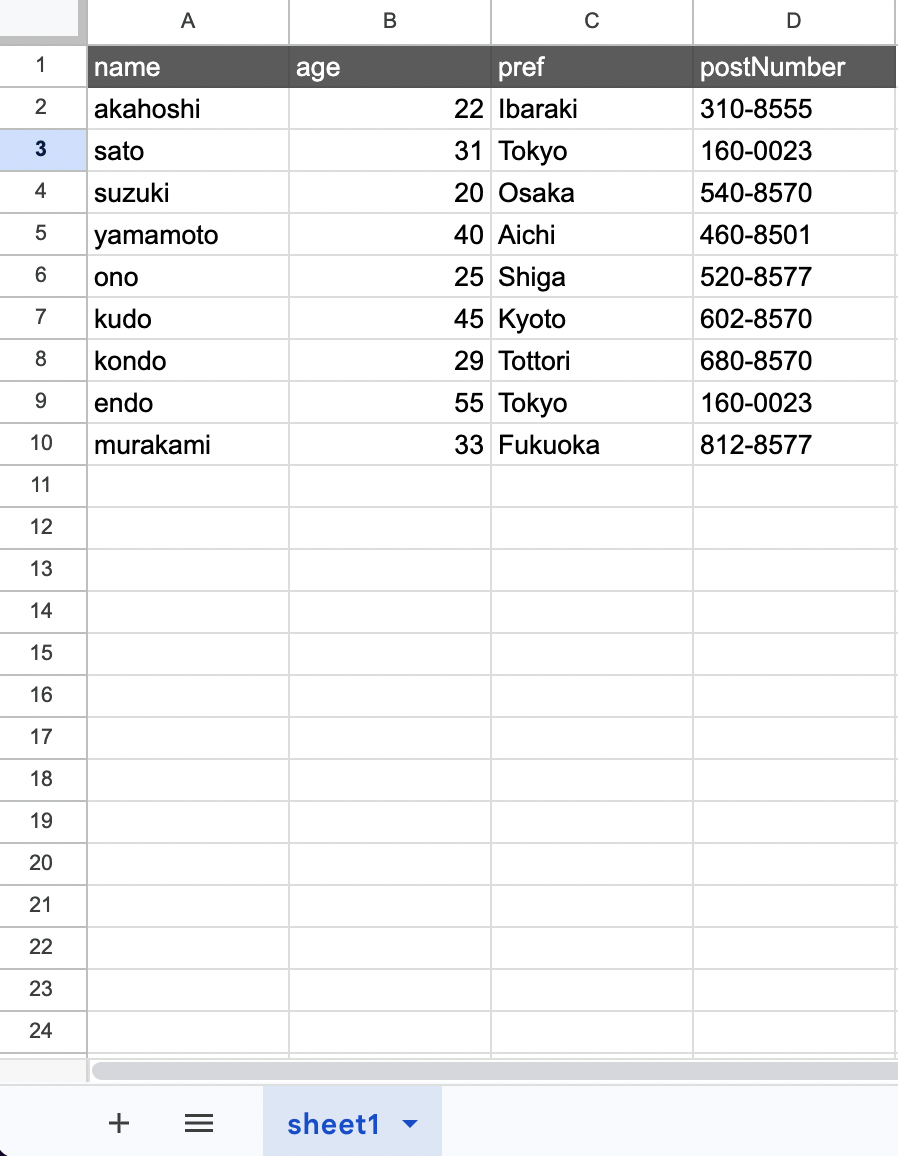
Description
Suppose you want to retrieve rows from the above example with the following condition:
- pref => Tokyo
The code would be:
const gassma = new GassmaClient();

// gassma.{{TARGET_SHEET_NAME}}.findMany
const result = gassma.sheet1.findMany({
  where: {
    pref: "Tokyo",
  },
});
The return value has the following format:
[
  { name: "sato", age: 31, pref: "Tokyo", postNumber: "160-0023" },
  { name: "endo", age: 55, pref: "Tokyo", postNumber: "160-0023" },
];
To specify multiple conditions:
const gassma = new GassmaClient();

// gassma.{{TARGET_SHEET_NAME}}.findMany
const result = gassma.sheet1.findMany({
  where: {
    pref: "Tokyo",
    age: 31,
  },
});
Operators and Partial Matching
Conditional searches using greater than/less than and partial matching are also possible. For example, to retrieve rows with the following conditions:
- age => 20 or older
- age => 30 or younger
The code would be:
const gassma = new GassmaClient();

// gassma.{{TARGET_SHEET_NAME}}.findMany
const result = gassma.sheet1.findMany({
  where: {
    age: {
      gte: 20,
      lte: 30,
    },
  },
});
The keys related to conditional searches are as follows:
| Key | Description | Example |
|---|---|---|
| equals | Equal to | equals: 20 |
| not | Not equal to | not: 20 |
| in | Contained in the specified list | in: [20, 21, 22] |
| notIn | Not contained in the specified list | notIn: [23, 24, 25] |
| lt | Less than | lt: 30 |
| lte | Less than or equal to | lte: 30 |
| gt | Greater than | gt: 20 |
| gte | Greater than or equal to | gte: 20 |
| contains | Whether the target data contains the specified string | contains: "AB" |
| startsWith | Whether the target data starts with the specified string | startsWith: "AB" |
| endsWith | Whether the target data ends with the specified string | endsWith: "YZ" |
| mode | Case sensitivity settings | mode: "insensitive" |
In addition to fixed values, you can use the fields property to specify a value from another column in the same row. For details, see the fields reference.
mode: "insensitive"
By specifying mode: "insensitive" with equals, not, contains, startsWith, or endsWith, you can compare without case sensitivity.
const gassma = new GassmaClient();

// Matches "alice", "Alice", "ALICE", etc.
const result = gassma.sheet1.findMany({
  where: {
    name: {
      equals: "alice",
      mode: "insensitive",
    },
  },
});
It can also be used with contains, startsWith, and endsWith:
// Matches "Hello World", "HELLO WORLD", etc.
const result = gassma.sheet1.findMany({
  where: {
    title: {
      contains: "hello",
      mode: "insensitive",
    },
  },
});
If mode is not specified or set to the default mode: "default", case is distinguished.
where values cannot be NaN / Infinity / -Infinity, invalid Dates (Invalid Date), arrays (except the arrays of in / notIn), functions, Symbols, or BigInts. Passing one throws a GassmaInvalidValueError (the same applies to cursor / having). Gassma.raw cannot be used in where either (see raw).
Objects a cell cannot hold are rejected as well. Every object other than Date and fields (FieldRef) — Map / Set / RegExp / Error / class instances / wrapper objects such as new String("x") — throws a GassmaInvalidValueError.
gassma.sheet1.findMany({ where: { name: new Map() } });
// => Invalid value for argument `name`. Expected a scalar value, but received a Map.

gassma.sheet1.findMany({ where: { name: new Point(1, 2) } });
// => Invalid value for argument `name`. Expected a scalar value, but received an object.
Conditions whose value is undefined are treated as "not specified". For details, see strictUndefinedChecks / Gassma.skip.
AND, OR, NOT
Searches with multiple conditions are also possible.
AND
For example, to retrieve rows with the following conditions:
- age => 22
- pref => Ibaraki
Using AND:
const gassma = new GassmaClient();

// gassma.{{TARGET_SHEET_NAME}}.findMany
const result = gassma.sheet1.findMany({
  where: {
    AND: [
      {
        age: 22,
      },
      {
        pref: "Ibaraki",
      },
    ],
  },
});
OR
For example, to retrieve rows with the following condition:
- age => 22 or 40
Using OR:
const gassma = new GassmaClient();

// gassma.{{TARGET_SHEET_NAME}}.findMany
const result = gassma.sheet1.findMany({
  where: {
    OR: [
      {
        age: 22,
      },
      {
        age: 40,
      },
    ],
  },
});
NOT
For example, to retrieve rows with the following conditions:
- age => not 22
- age => not 40
Using NOT:
const gassma = new GassmaClient();

// gassma.{{TARGET_SHEET_NAME}}.findMany
const result = gassma.sheet1.findMany({
  where: {
    NOT: [
      {
        age: 22,
      },
      {
        age: 40,
      },
    ],
  },
});
Nesting AND, OR, NOT
You can nest OR or NOT inside AND, for example. This nesting structure can be infinitely deep as long as the GAS call stack allows.
const gassma = new GassmaClient();

// gassma.{{TARGET_SHEET_NAME}}.findMany
const result = gassma.sheet1.findMany({
  where: {
    NOT: {
      AND: [
        {
          name: "akahoshi",
        },
        {
          age: 22,
        },
      ],
    },
  },
});
Empty AND, OR, NOT and Branches with No Conditions
An empty AND / NOT ([] or {}) is treated as always true (matches every row), and an empty OR: [] is treated as always false (matches nothing) — same as Prisma.
Branches that generate no conditions at all ({}, or objects whose values are only empty objects / undefined) are removed from the AND / OR / NOT arrays. If the OR array becomes empty as a result, no rows match.
gassma.sheet1.findMany({ where: { NOT: {} } }); // => every row
gassma.sheet1.findMany({ where: { AND: [] } }); // => every row
gassma.sheet1.findMany({ where: { OR: [] } }); // => []

gassma.sheet1.findMany({ where: { OR: [{ age: {} }] } }); // => [] (the condition-less branch is removed, leaving an empty OR)
gassma.sheet1.findMany({ where: { OR: [{}, { name: "akahoshi" }] } }); // => only the rows where name is "akahoshi"
gassma.sheet1.findMany({ where: { NOT: [{ age: {} }] } }); // => every row
gassma.sheet1.findMany({ where: { AND: [{ OR: [] }] } }); // => every row
OR only accepts an array. Passing a non-array such as OR: {} throws a GassmaInvalidValueError.
Relation Filters in where
When relation definitions exist, you can filter using conditions on related records within where (some, every, none, is, isNot).
For details, see the where relation filter reference.
Handling of null
Whether null is accepted depends on whether it sits in a value position or a structural position.
null in a value position (valid)
Passing null as a column value is a legitimate specification and finds rows whose cell is empty.
gassma.sheet1.findMany({ where: { age: null } });
gassma.sheet1.findMany({ where: { age: { equals: null } } });
gassma.sheet1.findMany({ where: { age: { not: null } } });
Passing null to is / isNot on a to-one relation (manyToOne / oneToOne) is valid in the same way (see where relation filters). Column values in having, and column values in data when writing, also accept null.
null in a structural position (error)
Passing null to an argument that expects an object or an array throws a GassmaInvalidValueError.
gassma.sheet1.findMany({ where: null });
// => GassmaInvalidValueError:
//    Invalid value for argument `where`. Expected an object, but received null.

gassma.sheet1.findMany({ where: { AND: null } });
// => Invalid value for argument `AND`. Expected an object or an array, but received null.

gassma.sheet1.findMany({ where: { name: { contains: null } } });
// => Invalid value for argument `contains`. Expected a string, but received null.
This covers top-level arguments (where / orderBy / cursor / distinct / by / having / data / create / update), AND / OR / NOT, to-many relation filters (some / every / none), nested write verbs (create / connect / connectOrCreate / set / disconnect / delete / update / deleteMany / updateMany / createMany), and the string and number operators (contains / startsWith / endsWith / gt / gte / lt / lte / increment / decrement / multiply / divide). Putting null in an array element raises the same error.
For the {expected} wording of each argument, see the error list.
cursor is the one exception: its column values cannot be null either. Because cursor identifies a single record, a null value throws a GassmaInvalidValueError (Invalid value for argument `id`. Expected a scalar value, but received null.). Here {argumentName} is the column name.
A null written directly under select / include / omit is still ignored (that field is treated as not specified).
select
You can limit the data returned in the response.
For example, to retrieve only age and pref:
const gassma = new GassmaClient();

// gassma.{{TARGET_SHEET_NAME}}.findMany
const result = gassma.sheet1.findMany({
  where: {
    age: {
      gte: 20,
    },
  },
  select: {
    name: true,
    pref: true,
  },
});
The return value would be:
[
  { name: "akahoshi", pref: "Ibaraki" },
  { name: "sato", pref: "Tokyo" },
  { name: "suzuki", pref: "Osaka" },
  { name: "yamamoto", pref: "Aichi" },
  { name: "ono", pref: "Shiga" },
  { name: "kudo", pref: "Kyoto" },
  { name: "kondo", pref: "Tottori" },
  { name: "endo", pref: "Tokyo" },
  { name: "murakami", pref: "Fukuoka" },
];
A select with no selected fields at all, such as select: {}, throws a GassmaInvalidValueError (Invalid value for argument select. Expected at least one selected field.). The same applies when all keys become empty through undefined.
Relation Options within select
When relation definitions exist, you can specify options similar to include for relation fields within select. Instead of specifying include separately, you can control related data retrieval within select.
This example shows the relation definitions in the constructor. When using the CLI, relations are written in schema.prisma (Relation Definition).
const gassma = new Gassma.GassmaClient({
  relations: {
    Users: {
      posts: { type: "oneToMany", to: "Posts", field: "id", reference: "authorId" },
    },
  },
});

const result = gassma.Users.findMany({
  select: {
    id: true,
    name: true,
    posts: {
      select: { id: true, title: true },
      where: { published: true },
      orderBy: { id: "desc" },
    },
    _count: true,
  },
});
The options available for relation fields are the same as include options (select, where, orderBy, include, omit, take, skip).
Deep nesting is also supported:
const result = gassma.Users.findMany({
  select: {
    id: true,
    posts: {
      select: {
        id: true,
        comments: {
          select: { id: true, text: true },
        },
      },
    },
  },
});
Relation fields can also be specified with true, which retrieves all scalar columns of the related model (this works at any depth, just like the top-level select):
const result = gassma.Users.findMany({
  select: {
    posts: {
      select: {
        title: true,
        comments: true, // retrieves all scalar columns of comments
      },
    },
  },
});
Top-level select and include cannot be used simultaneously. If you need related data, specify relation options within select or use include alone.
orderBy
You can sort the retrieved rows.
For example, to sort by age in ascending order:
const gassma = new GassmaClient();

// gassma.{{TARGET_SHEET_NAME}}.findMany
const result = gassma.sheet1.findMany({
  where: {
    age: {
      gte: 20,
    },
  },
  orderBy: {
    age: "asc",
  },
});
The available values are:
| Key | Meaning |
|---|---|
| asc | Ascending order |
| desc | Descending order |
Null Value Sort Order Control
You can control the position of null values by specifying the nulls option in object format:
const gassma = new GassmaClient();

// Place null values at the end
const result = gassma.sheet1.findMany({
  orderBy: {
    age: { sort: "asc", nulls: "last" },
  },
});
// => [20, 22, 31, 40, 55, null, null]
| nulls value | Behavior |
|---|---|
"first" | Place null values at the beginning |
"last" | Place null values at the end |
When nulls is not specified, null values are placed at the beginning for asc and at the end for desc.
NaN and invalid Dates (Invalid Date) are also treated as "missing values" like null, and are placed in the same position as null (they are also subject to the nulls option).
You can also specify multiple sort conditions. For example, to:
- Sort by
agein ascending order - If
agevalues are the same, sort those rows bynamein ascending order
The code would be:
const gassma = new GassmaClient();

// gassma.{{TARGET_SHEET_NAME}}.findMany
const result = gassma.sheet1.findMany({
  where: {
    age: {
      gte: 20,
    },
  },
  orderBy: [{ age: "asc" }, { name: "asc" }],
});
*Sort priority follows the order of index numbers (lower index = higher priority).
An empty orderBy such as orderBy: {} is ignored (no sorting is performed). If an entry in the array becomes empty after removing undefined, only that entry is ignored and the remaining entries are used for sorting.
Sorting by Relation Fields
When relation definitions exist, you can sort by manyToOne / oneToOne relation target fields:
This example shows the relation definitions in the constructor. When using the CLI, relations are written in schema.prisma (Relation Definition).
const gassma = new Gassma.GassmaClient({
  relations: {
    Posts: {
      author: {
        type: "manyToOne",
        to: "Users",
        field: "authorId",
        reference: "id",
      },
    },
  },
});

// Sort posts by author name in ascending order
const result = gassma.Posts.findMany({
  orderBy: { author: { name: "asc" } },
});
Records with null FK are placed at the beginning for asc and at the end for desc.
Field sorting is not available for oneToMany / manyToMany relations. RelationOrderByUnsupportedTypeError will be thrown.
Passing a non-object to a relation name throws a GassmaInvalidValueError.
gassma.Posts.findMany({ orderBy: { author: new Date() } });
// => Invalid value for argument `author`. Expected a relation orderBy object.
To sort by a field of the related record, pass an object such as orderBy: { author: { name: "asc" } }.
Sorting by _count
You can sort by the number of records in oneToMany / manyToMany relations:
// Sort users by number of posts in descending order
const result = gassma.Users.findMany({
  orderBy: { posts: { _count: "desc" } },
});
It can also be combined with scalar sorting:
// Sort by post count descending → then by name ascending for ties
const result = gassma.Users.findMany({
  orderBy: [
    { posts: { _count: "desc" } },
    { name: "asc" },
  ],
});
_count sorting is not available for manyToOne / oneToOne relations. RelationOrderByCountUnsupportedTypeError will be thrown.
take
You can specify the number of records to retrieve. Records are taken from the top of the sheet.
For example, to get the top 2 rows from matching records:
const gassma = new GassmaClient();

// gassma.{{TARGET_SHEET_NAME}}.findMany
const result = gassma.sheet1.findMany({
  where: {
    age: {
      gte: 20,
    },
  },
  take: 2,
});
Negative take Values
Specifying a negative value for take retrieves N records from the end:
// Get the last 2 records matching the condition
const result = gassma.sheet1.findMany({
  where: {
    age: { gte: 20 },
  },
  take: -2,
});
When take is negative, the direction of skip is also reversed. skip becomes the number of records to exclude from the end:
// After excluding the last 1 record, get the remaining last 2 records
const result = gassma.sheet1.findMany({
  take: -2,
  skip: 1,
});
skip
You can skip specific rows from the retrieved results.
For example, to skip the first matching row:
const gassma = new GassmaClient();

// gassma.{{TARGET_SHEET_NAME}}.findMany
const result = gassma.sheet1.findMany({
  where: {
    age: {
      gte: 20,
    },
  },
  skip: 1,
});
Specifying a finite negative value for skip throws GassmaSkipNegativeError.
Invalid take / skip values
Passing NaN / Infinity / -Infinity / null to take / skip throws a GassmaInvalidValueError.
gassma.sheet1.findMany({ take: NaN });
// => Invalid value for argument `take`. Expected a finite number, but received NaN.

gassma.sheet1.findMany({ skip: null });
// => Invalid value for argument `skip`. Expected a number, but received null.
| Value | Behaviour |
|---|---|
NaN / Infinity / -Infinity | GassmaInvalidValueError (Expected a finite number, but received ...) |
null | GassmaInvalidValueError (Expected a number, but received null.) |
| A finite negative number | take reads from the end; skip throws GassmaSkipNegativeError |
undefined | Treated as "not specified" and ignored |
The finiteness check runs first, so skip: -Infinity throws GassmaInvalidValueError. GassmaSkipNegativeError is thrown only for finite negative numbers.
The same validation applies to take / skip in count / aggregate / groupBy. The take of findFirst has a different restriction.
cursor
Enables cursor-based pagination. Specify an object that uniquely identifies a record in cursor to use that record as the starting point:
const gassma = new GassmaClient();

// Starting from the record with id: 3, retrieve 5 records
const result = gassma.sheet1.findMany({
  cursor: { id: 3 },
  take: 5,
});
When take is positive, records are retrieved toward the end from the cursor position. When take is negative, records from the beginning up to the cursor position are retrieved:
// Starting from id: 3, retrieve records toward the beginning
const result = gassma.sheet1.findMany({
  cursor: { id: 3 },
  take: -5,
});
Combined with skip, you can skip further from the cursor position:
// Starting from id: 3, skip 1 record and retrieve 5 records
const result = gassma.sheet1.findMany({
  cursor: { id: 3 },
  skip: 1,
  take: 5,
});
If the record specified in cursor is not found, an empty array is returned.
A cursor with no columns at all, such as cursor: {}, throws a GassmaInvalidValueError (Invalid value for argument cursor. Expected at least one column.). The same applies when all keys become empty through undefined. Passing an incomparable value such as NaN or an invalid Date (Invalid Date) as a cursor value also throws a GassmaInvalidValueError.
Processing Order
The execution order when combining where, orderBy, cursor, distinct, skip, and take:
where- FilterorderBy- Sort- Reverse the order when
takeis negative cursor- Slice at cursor position (inclusive of the cursor itself)distinct- Deduplicationskip- Skiptake- Limit (when negative, takes the absolute number of records, then restores the order to normal at the end)select/omit- Field shaping
distinct is applied after cursor. Duplicates are removed within the range sliced by the cursor.
omit
You can exclude specific columns from the return value. This is the inverse of select.
For example, to exclude postNumber:
const gassma = new GassmaClient();

// gassma.{{TARGET_SHEET_NAME}}.findMany
const result = gassma.sheet1.findMany({
  where: {
    pref: "Tokyo",
  },
  omit: {
    postNumber: true,
  },
});
The return value would be:
[
  { name: "sato", age: 31, pref: "Tokyo" },
  { name: "endo", age: 55, pref: "Tokyo" },
];
select and omit cannot be used simultaneously. Specifying both throws GassmaFindSelectOmitConflictError.
When global omit is configured, you can override it with { field: false } in the query's omit. For details, see overriding global omit with query omit.
distinct
Specify column names to remove rows with duplicate values. When duplicates exist, data from the upper row takes priority.
For example, to remove age duplicates:
const gassma = new GassmaClient();

// gassma.{{TARGET_SHEET_NAME}}.findMany
const result = gassma.sheet1.findMany({
  where: {
    age: {
      gte: 20,
    },
  },
  distinct: ["age"],
});
Because distinct is applied after cursor, duplicates are removed within the range sliced by the cursor (see "Processing Order" above).
When take is negative, deduplication runs on the reversed order, so the remaining "first occurrence" is the record on the tail side. The final output is restored to normal order.
Duplicates are detected using normalized keys.
- Dates with the same time are considered the same value even if they are different instances. A Date and an ISO string of the same time are different values.
- The number
1and the string"1"are different values. NaNvalues collapse into one, and invalid Dates (Invalid Date) collapse into one.NaN,null, and Invalid Date are all distinct from each other.
include
When relation definitions exist, you can retrieve related data together.
For details, see the include reference.