What is GASsma
GASsma is a library that lets you manipulate Google Spreadsheet tables like "Prisma", one of the popular ORM libraries for Node.js.
By operating spreadsheets like an ORM, it aims to make writing GoogleAppsScript (GAS):
- More manageable
- Less error-prone
- More secure
Getting Started
There are two ways to use GASsma. Both give you the same features.
| Approach | How to start |
|---|---|
| CLI (local development) | Generate sheet types from schema.prisma and write code with completion and type checking → Quickstart |
| GAS editor only | Add the library and start writing right away → the steps below |
Below is the shortest example, using only the GAS editor.
Create a new spreadsheet and enter the following data. (Name the sheet "sheet1")
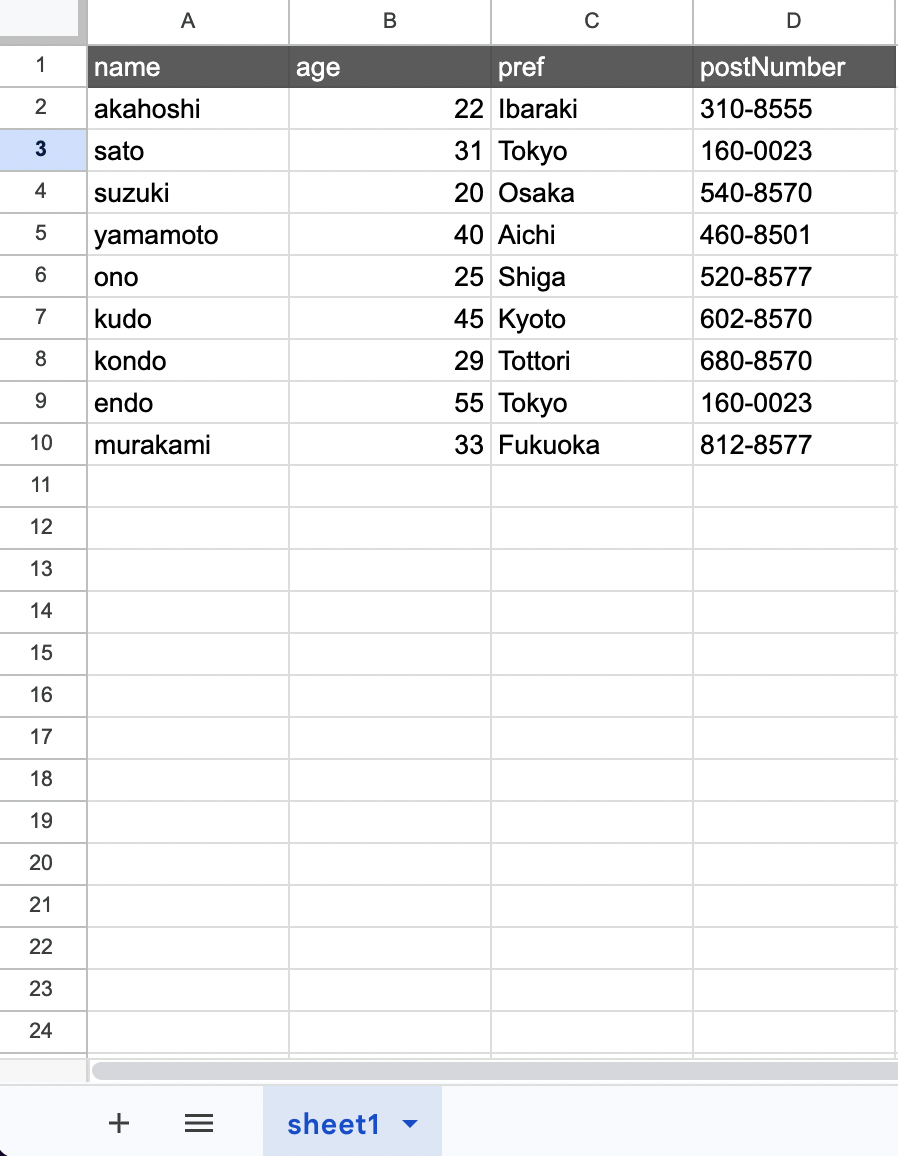
Then open Extensions > Apps Script to launch the GAS editor.
Once open, follow Installation to add the GASsma library.
Now let's consider how to extract and format data from the sheet we just created:
- Extract rows where age is 25 or older
- Sort the extracted rows in ascending order by name
- Convert to an associative array keyed by column names
Let's write this with GASsma. Write the following code and run myFunction:
const gassma = new Gassma.GassmaClient();

function myFunction() {
  const result = gassma.sheet1.findMany({
    where: {
      age: {
        gte: 25,
      },
    },
    orderBy: {
      name: "asc",
    },
  });

  console.log(result);
}
That's it.
Simply create an instance and call the findMany method to extract data. The library automatically reads column names for you.
When developing locally with TypeScript, you can generate sheet types from schema.prisma. Sheet and column names get completion, and mistakes surface at build time. See the Quickstart.
Why is GASsma Needed
There are mainly 3 difficulties when manipulating spreadsheets with existing GAS:
1. Complexity of Code Management
Writing the above example in standard GAS would look like this:
function myFunction() {
  const sheet = SpreadsheetApp.getActiveSpreadsheet();
  const hogeSheet = sheet.getSheetByName("sheet1");

  const rowLength = hogeSheet.getLastRow() - 1;
  if (rowLength === 0) {
    console.log([]);
    return;
  }

  // Extract data from specified range
  const data = hogeSheet.getRange(2, 1, rowLength, 4).getValues();

  // Filter rows where age is 25 or older
  const gte25Data = data.filter((row) => row[1] >= 25);

  // Sort
  const gte25DataSorted = gte25Data.sort((a, b) => (a[0] >= b[0] ? 1 : -1));

  // Convert to associative array
  const gte25DataSortedDict = gte25DataSorted.map((row) => {
    return {
      name: row[0],
      age: row[1],
      pref: row[2],
      postNumber: row[3],
    };
  });

  console.log(gte25DataSortedDict);
}
However, this is still relatively short code with simple logic.
If additional conditions like:
"If names are the same, sort by age in ascending order"
keep increasing, or if there are complex requirements like:
"Find the average age of people aged 25-60 whose prefecture is Tokyo"
the code becomes complex and difficult to manage.
2. Error-Prone Nature of Code
GAS spreadsheet operations are inherently error-prone. When extracting data from a specified range in a spreadsheet, you use getRange(). getRange() is a method that extracts cells from a specified range by taking row and column numbers as arguments.
In other words, every time you use getRange(), you need to check the row and column numbers of cells on the spreadsheet. This means there's a risk of miscounting. The more you use getRange() in your code, the higher this risk becomes.
3. Security Awareness Required
Consider inserting data submitted from a Google Form into a spreadsheet. For example, the following code has a problem. Can you spot it?
function myFunction(e) {
  // Get values submitted from Google Form
  const values = e.namedValues;
  const newValues = [values["Name"], values["Age"], values["Prefecture"], values["Postal Code"]];

  const sheet = SpreadsheetApp.getActiveSpreadsheet();
  const hogeSheet = sheet.getSheetByName("sheet1");
  const newRow = hogeSheet.getLastRow() + 1;

  // Insert into sheet
  hogeSheet.getRange(newRow, 1, 1, 4).setValues([newValues]);
}
The answer is: if a malicious user enters a spreadsheet formula like =C1 in the form response field, arbitrary unauthorized operations can be executed. (Formula Injection)
The library that solves these problems is "GASsma".
Note that formula injection is prevented by automatic escaping at write time. If you intentionally want to write a formula, see raw.