groupBy()
Use this when you want to group data.
Available Keys
| Key Name | Description | Optional | Notes |
|---|---|---|---|
| where | Specify retrieval conditions | Yes | If omitted, all rows are retrieved |
| orderBy | Sort settings | Yes | If specifying only one column, the array can be omitted |
| take | Set the number of records to retrieve | Yes | |
| skip | Set the number of records to skip | Yes | |
| _avg | Average display settings | Yes | Only numeric columns can be specified |
| _count | Hit count display settings | Yes | Any column can be specified. _all and the true shorthand are also available. See _count for details |
| _max | Maximum value display settings | Yes | Number / string / boolean / date columns can be specified |
| _min | Minimum value display settings | Yes | Number / string / boolean / date columns can be specified |
| _sum | Sum display settings | Yes | Only numeric columns can be specified |
| by | Specify grouping conditions | No | |
| having | Specify conditions after grouping | Yes | If omitted, all data is retrieved |
by is required. Omitting it throws GassmaMissingArgumentError (message: Argument by is missing.).
orderBy is required when you specify take, or a skip other than 0. Without it, GassmaGroupByOrderByRequiredError is thrown (message: groupBy requires orderBy when using take. Specify orderBy with at least one field, or remove take.). An empty orderBy does not count as specified.
In where, you can also use relation filters (some / every / none / is / isNot).
Example Sheet
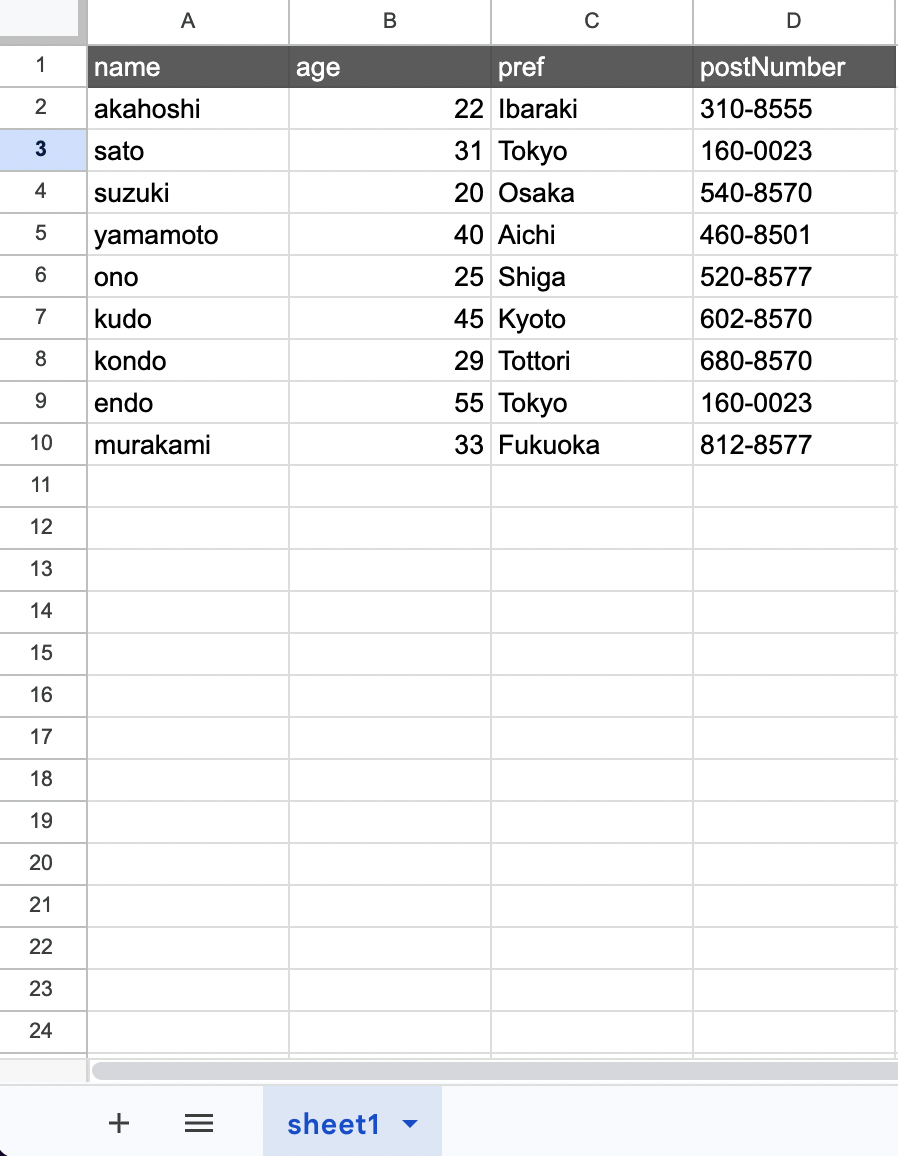
Explanation
Suppose you want to perform the following operation from the example above.
- Group by pref
The code would be as follows.
// gassma.{{TARGET_SHEET_NAME}}.groupBy
const result = gassma.sheet1.groupBy({
  by: "pref",
});
The return value is in the following format.
[
  { pref: "Ibaraki" },
  { pref: "Tokyo" },
  { pref: "Osaka" },
  { pref: "Aichi" },
  { pref: "Shiga" },
  { pref: "Kyoto" },
  { pref: "Tottori" },
  { pref: "Fukuoka" },
];
You can also specify multiple fields. Suppose you want to perform the following operations.
- Group by pref
- Additionally group by age
The code would be as follows.
// gassma.{{TARGET_SHEET_NAME}}.groupBy
const result = gassma.sheet1.groupBy({
  by: ["pref", "age"],
});
The return value is in the following format.
[
  { pref: "Ibaraki", age: 22 },
  { pref: "Tokyo", age: 31 },
  { pref: "Tokyo", age: 55 },
  { pref: "Osaka", age: 20 },
  { pref: "Aichi", age: 40 },
  { pref: "Shiga", age: 25 },
  { pref: "Kyoto", age: 45 },
  { pref: "Tottori", age: 29 },
  { pref: "Fukuoka", age: 33 },
];
Missing Values as Group Keys (null / NaN / Invalid Date)
Rows whose value in a by column is null / NaN / an invalid Date (Invalid Date) are also grouped rather than dropped.
- Rows with
NaNcollapse into a single group. - Rows with Invalid Date also collapse into a single group, even across different instances.
NaN, null, and Invalid Date form separate groups from each other.
having
Use this when you want to extract data that meets specific conditions from grouped data.
For example, suppose you want to extract data with the following conditions.
- Group by pref
- (After grouping) age => average is 30 or less
The code would be as follows.
// gassma.{{TARGET_SHEET_NAME}}.groupBy
const result = gassma.sheet1.groupBy({
  by: ["pref"],
  having: {
    age: {
      _avg: {
        lte: 30,
      },
    },
  },
});
The return value is in the following format.
[
  { pref: "Ibaraki" },
  { pref: "Osaka" },
  { pref: "Shiga" },
  { pref: "Tottori" },
];
AND, OR, NOT in having
You can also use AND, OR, and NOT.
For example, suppose you want to perform the following operation.
- Group by pref
- (After grouping) age => average is NOT 30 or less
The code would be as follows.
// gassma.{{TARGET_SHEET_NAME}}.groupBy
const result = gassma.sheet1.groupBy({
  by: ["pref"],
  having: {
    NOT: {
      age: {
        _avg: {
          lte: 30,
        },
      },
    },
  },
});
The return value would be as follows.
[{ pref: "Tokyo" }, { pref: "Aichi" }, { pref: "Kyoto" }, { pref: "Fukuoka" }];
Also, just like where, you can nest AND inside NOT and create other nested combinations.
Passing an incomparable value such as NaN or an invalid Date (Invalid Date) as a having value throws a GassmaInvalidValueError (same as where).
Displaying Statistics
You can also display statistics such as averages, just like with aggregate.
For example, suppose you want to perform the following operations.
- Group by pref
- Display the average of age
The code would be as follows.
// gassma.{{TARGET_SHEET_NAME}}.groupBy
const result = gassma.sheet1.groupBy({
  by: ["pref"],
  _avg: { age: true },
});
The return value is in the following format.
[
  { pref: "Ibaraki", _avg: { age: 22 } },
  { pref: "Tokyo", _avg: { age: 43 } },
  { pref: "Osaka", _avg: { age: 20 } },
  { pref: "Aichi", _avg: { age: 40 } },
  { pref: "Shiga", _avg: { age: 25 } },
  { pref: "Kyoto", _avg: { age: 45 } },
  { pref: "Tottori", _avg: { age: 29 } },
  { pref: "Fukuoka", _avg: { age: 33 } },
];
In _avg / _sum / _max / _min and column-specified _count, NaN / invalid Dates (Invalid Date) are excluded from aggregation as missing values, just like null. If every aggregated value is missing, the result is null. _count: { _all: true } still counts those rows.
The column types each aggregation key accepts are the same as in aggregate. See Columns Each Aggregation Key Accepts in aggregate for details.
_count
With _count, you can count the number of rows in each group. If you specify a column name, only rows whose value in that column is not a missing value — null (an empty cell), NaN, or an invalid Date (Invalid Date) — are counted, while _all: true counts all rows, including missing values.
For example, suppose you want to perform the following operations.
- Group by pref
- Display the number of rows in each group
The code would be as follows.
// gassma.{{TARGET_SHEET_NAME}}.groupBy
const result = gassma.sheet1.groupBy({
  by: ["pref"],
  _count: { _all: true },
});
The return value is in the following format.
[
  { pref: "Ibaraki", _count: { _all: 1 } },
  { pref: "Tokyo", _count: { _all: 2 } },
  { pref: "Osaka", _count: { _all: 1 } },
  { pref: "Aichi", _count: { _all: 1 } },
  { pref: "Shiga", _count: { _all: 1 } },
  { pref: "Kyoto", _count: { _all: 1 } },
  { pref: "Tottori", _count: { _all: 1 } },
  { pref: "Fukuoka", _count: { _all: 1 } },
];
If you use the _count: true shorthand, the row count is returned directly as a number.
// gassma.{{TARGET_SHEET_NAME}}.groupBy
const result = gassma.sheet1.groupBy({
  by: ["pref"],
  _count: true,
});
The return value is in the following format.
[
  { pref: "Ibaraki", _count: 1 },
  { pref: "Tokyo", _count: 2 },
  { pref: "Osaka", _count: 1 },
  { pref: "Aichi", _count: 1 },
  { pref: "Shiga", _count: 1 },
  { pref: "Kyoto", _count: 1 },
  { pref: "Tottori", _count: 1 },
  { pref: "Fukuoka", _count: 1 },
];
_all and the true shorthand are exclusive to _count and cannot be used with _avg / _max / _min / _sum. See _count in aggregate for details.